The cheapest verified portable SSD in our live tracking right now is a 1TB USB 3.2 Gen 2 drive at $83.99 ($0.084/GB). A 256GB model runs close behind at $0.086/GB, and at the high end, an 8TB rugged drive comes in at $0.094/GB. Notice how flat that curve is — unlike spinning hard drives, portable SSD pricing doesn't reward buying bigger nearly as much. Check the live table below for what's actually in stock today, since portable SSD pricing shifts weekly and sometimes daily.
Top SSDs by $/GB — Live Prices
View all →| # | Product | Capacity | $/GB | Price | Retailer |
|---|---|---|---|---|---|
| 1 | Sandisk Optimus 5100 500GB NVMe SSD, PCIe 4.0, M.2 2280 | Up to 6,600MB/s Read Speeds, Up to 5,600MB/s Write Speeds, Internal Solid State Drive - SDSP51500GAN | 500 GB | $0.022/GB | $109.99 | Best Buy |
| 2 | Bestoss 2.5' 4TB SSD SATA III 6Gb/s 3D NAND Internal Solid State Hard Drive SSDs for Laptop and Computer, Up to 550MB/s, laptop PC Desktop compatible | 4 TB | $0.081/GB | $322.99 | Newegg |
| 3 | TEAMGROUP T-Force Vulcan Z 4TB SLC Cache 3D NAND QLC 2.5 Inch SATA III Internal Solid State Drive SSD (R/W Speed up to 550/470 MB/s) T253TY004T0C101 | 4 TB | $0.085/GB | $339.99 | Amazon |
| 4 | TEAMGROUP QX 4TB 3D NAND QLC 2.5 Inch SATA III Internal Solid State Drive SSD R/W Speed up to 500/460 MB/s 800TBW Laptop & PC Desktop T253X7004T0C101 | 4 TB | $0.086/GB | $345.99 | Amazon |
| 5 | KingSpec P3 SSD 4TB Internal 2.5' Solid State Drive 2.5 Inch SATA III 3D NAND Flash Data Storage, Speed up to 520MB/s, laptop PC Desktop | 4 TB | $0.087/GB | $348.99 | Newegg |
Sandisk Optimus 5100 500GB NVMe SSD, PCIe 4.0, M.2 2280 | Up to 6,600MB/s Read Speeds, Up to 5,600MB/s Write Speeds, Internal Solid State Drive - SDSP51500GAN
500 GB · Best Buy
$0.022/GB
$109.99
Bestoss 2.5' 4TB SSD SATA III 6Gb/s 3D NAND Internal Solid State Hard Drive SSDs for Laptop and Computer, Up to 550MB/s, laptop PC Desktop compatible
4 TB · Newegg
$0.081/GB
$322.99
TEAMGROUP T-Force Vulcan Z 4TB SLC Cache 3D NAND QLC 2.5 Inch SATA III Internal Solid State Drive SSD (R/W Speed up to 550/470 MB/s) T253TY004T0C101
4 TB · Amazon
$0.085/GB
$339.99
TEAMGROUP QX 4TB 3D NAND QLC 2.5 Inch SATA III Internal Solid State Drive SSD R/W Speed up to 500/460 MB/s 800TBW Laptop & PC Desktop T253X7004T0C101
4 TB · Amazon
$0.086/GB
$345.99
KingSpec P3 SSD 4TB Internal 2.5' Solid State Drive 2.5 Inch SATA III 3D NAND Flash Data Storage, Speed up to 520MB/s, laptop PC Desktop
4 TB · Newegg
$0.087/GB
$348.99
Best Picks at a Glance — What's Verified Right Now
The table above pulls live prices across the SSD category, which includes both internal and portable (external) drives. If you're shopping specifically for a portable/external SSD, here's what's verified in that scope as of this update:
| Drive | Capacity | Price | $/GB | Notes |
|---|---|---|---|---|
| KingSpec MemoStone External SSD | 1TB | $83.99 | $0.084/GB | USB 3.2 Gen 2, up to 1,030 MB/s, dual USB-C/USB-A |
| KingSpec MemoStone Portable SSD | 256GB | $21.99 | $0.086/GB | USB 3.2, up to 490 MB/s, Type-C |
| Lexar Armor 700 Portable SSD | 8TB | $749.99 | $0.094/GB | USB 3.2 Gen 2x2, IP66 rugged rating |
That's a thinner lineup than you'd expect from a category this popular — 2TB and 4TB, the capacities most buyers actually shop for, don't currently have a verified portable listing in our tracking. That doesn't mean nothing exists at those sizes; it means we don't have a live-confirmed price to publish for them right now. Use the live SSD rankings to see what's actually in stock today across every capacity.
BuyPerUnit tracks SSD prices daily across Amazon, Best Buy, and Newegg. Every drive is ranked by price per GB so you can spot genuine value without digging through spec sheets.
What the Flat Price Curve Tells You
With hard drives, price per GB usually drops sharply as capacity climbs — a 4TB HDD is dramatically cheaper per GB than a 500GB one. Portable SSDs don't follow that pattern nearly as closely. In our verified data, the 1TB drive at $0.084/GB and the 256GB drive at $0.086/GB are separated by less than a fifth of a cent per GB, and the 8TB rugged drive actually costs more per GB than either smaller option, largely because of its ruggedization and higher-end controller.
The takeaway: don't assume "buy the biggest one" is automatically the best-value move with portable SSDs the way it usually is with spinning storage. Check the actual $/GB on the day you buy — it moves around, and the capacity that wins this week might not win next week.
SSD vs External Hard Drive: The Real Tradeoff
If you haven't read our external hard drive guide, the short version is that HDDs still cost meaningfully less per gigabyte than SSDs for bulk storage. That gap is real and it isn't closing anytime soon — flash memory is simply a more expensive medium per byte than spinning platters.
So why pay the SSD premium at all? A few reasons that have nothing to do with price:
Speed. A USB 3.2 Gen 2 portable SSD delivers 800 to 1,000 MB/s in real-world transfers. An external hard drive tops out around 120 to 150 MB/s — copying 100GB of video takes minutes on an SSD versus a quarter hour or more on an HDD.
Durability. No moving parts means no head crashes from a drop. Portable SSDs are generally rated for drops of 1 to 2 meters onto hard surfaces; a dropped external HDD can lose everything instantly.
Size and weight. Most portable SSDs are smaller than a credit card and weigh under 50 grams. External hard drives run closer to smartphone-sized and 150–250 grams.
Silence and power draw. No spinning platters means no noise, no vibration, and lower power draw — useful if you're recording audio nearby or running off a single USB port.
If this is bulk backup storage you write to occasionally, the HDD is still the better dollar-for-dollar deal. If you're actively working off the drive — editing, gaming, running backups constantly — the SSD earns its premium in time saved.
USB 3.2 vs USB4 vs Thunderbolt: What Speed Do You Actually Get?
The interface labeling on portable SSDs is a mess, so here's the practical reality:
USB 3.2 Gen 2 (10 Gbps): The standard for most portable SSDs in 2026. Real-world speeds hit 800 to 1,000 MB/s, which saturates the SATA-based controllers inside most budget portable drives. Fast enough for nearly everyone, and the interface both of our verified KingSpec drives use.
USB 3.2 Gen 2x2 (20 Gbps): Doubles the bandwidth over Gen 2. Useful only if the drive has an NVMe-class controller inside — our verified Lexar Armor 700 is one example. Real-world speeds hit 1,500 to 1,800 MB/s, but your computer needs a matching 20 Gbps port to see the benefit, and many laptops don't have one.
USB4 and Thunderbolt (40 Gbps): Overkill for most people. Makes sense only if you're editing 8K video directly off the drive or moving hundreds of gigabytes daily. Drives at this tier carry a real cost premium.
The cable matters as much as the drive. A 10 Gbps drive connected with a USB 2.0 cable runs at USB 2.0 speeds (480 Mbps). Always use the cable that shipped with the drive, or one explicitly rated for the correct speed tier.
The recommendation: USB 3.2 Gen 2 (10 Gbps) is the best value tier for most buyers — 6 to 8 times the speed of an external hard drive without paying for bandwidth you can't use. Pay for 20 Gbps or higher only if your computer's ports can actually deliver it.
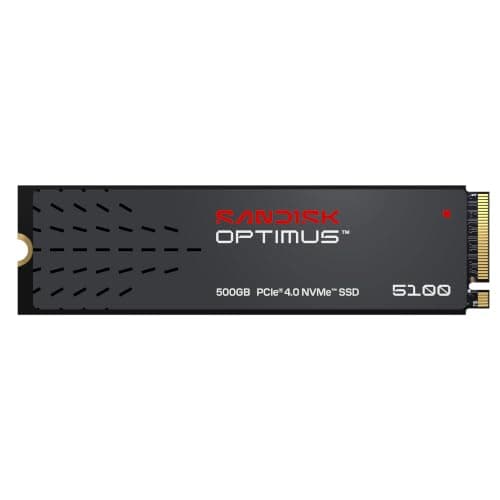
Sandisk Optimus 5100 500GB NVMe SSD, PCIe 4.0, M.2 2280 | Up to 6,600MB/s Read Speeds, Up to 5,600MB/s Write Speeds, Internal Solid State Drive - SDSP51500GAN
Price updated twice daily. Affiliate link.
Choosing by Capacity: What We Can Verify
Rather than pretend we have live pricing at every capacity tier, here's what our tracking actually confirms right now, plus general guidance for the tiers we don't currently have a verified portable listing for.
256GB — Confirmed at $0.086/GB
Useful for carrying an active project or backing up a laptop, not for long-term bulk storage. Our verified 256GB portable SSD comes in at $21.99. This tier typically carries the highest per-GB cost of any capacity, which held true here — it's priced almost identically to the 1TB option below on a per-GB basis, meaning you're not saving much by buying small.
1TB — Confirmed at $0.084/GB, Currently the Best Verified Value
This is the cheapest per-GB portable SSD we can currently verify, at $83.99. 1TB is enough for a substantial backup, a solid game library, or a photographer's full multi-day shoot in RAW.
2TB and 4TB — No Verified Portable Listing Right Now
These are the capacities most shoppers actually want, and we don't currently have a confirmed portable SSD price to publish for either. That's a gap in what we can verify today, not a claim that nothing exists at these sizes. Check the live SSD rankings directly before buying at these capacities — the picture changes daily.
8TB — Confirmed at $0.094/GB, Premium Territory
Our verified 8TB option is a rugged, IP66-rated drive at $749.99. Large-capacity portable SSDs like this typically cost more per GB than the 1TB sweet spot, which is consistent with what we're seeing here — you're paying for both capacity and the rugged build.
Browse All SSDs Ranked by Price Per GB →Best Use Cases for a Portable SSD
Video Editing in the Field
If you shoot 4K or higher, editing directly off a portable SSD eliminates the bottleneck of copying footage to internal storage first. A 10 Gbps USB-C drive handles 4K editing smoothly; for 8K or multi-cam work, look for a 20 Gbps drive if your laptop supports it.
Recommended capacity: 1TB minimum, 2TB if you can find one at a reasonable $/GB. A single day of 4K shooting can generate 200 to 500GB of footage depending on codec and frame rate.
Console and Steam Deck Game Storage
The PS5 and Steam Deck both support USB external storage for game libraries. The PS5 cannot play PS5 games directly from an external drive — those must run from internal storage or an NVMe expansion card — but PS4 games and media storage work fine externally. The Steam Deck can run games directly off a USB-C portable SSD.
Recommended capacity: 1TB to 2TB. Modern games range from 30 to 150GB each.
Photography and Creative Work
A portable SSD provides fast, reliable field backup for RAW shooters — much faster than writing to a second memory card. Plug in via USB-C, drag and drop, and you have an immediate backup.
Recommended capacity: 1TB for hobbyists, more for professionals shooting multi-day events.
Time Machine and System Backups
A portable SSD makes Time Machine (macOS) and system image backups (Windows) significantly faster than an external HDD, especially on the first full backup.
Recommended capacity: Roughly 2x your internal drive's storage, so you have room for multiple backup snapshots.
The Bottom Line
Portable SSD pricing in 2026 doesn't follow the simple "bigger is cheaper per GB" curve you'd expect from hard drives — our verified data shows a 256GB and a 1TB drive landing within a fraction of a cent of each other per GB, with the 1TB actually winning. The real lesson is to stop assuming and start checking: compare price per gigabyte on the day you buy, not last month's advice.
We don't currently have verified portable pricing at 2TB or 4TB, which are the capacities most people actually want. That's worth knowing before you shop — check the 1TB portable SSD listings or the full live rankings directly rather than assuming a specific model or price from an old article, including this one from a few months back.
Find the Best SSD Deal Right Now →Frequently Asked Questions
Is a portable SSD worth it over an external hard drive?
For most active-use cases — editing, gaming, frequent backups — yes, the speed and durability gains justify the premium. If this is bulk archival storage you rarely touch, an external hard drive remains the cheaper per-gigabyte option.
How fast is a portable SSD?
Most portable SSDs use USB 3.2 Gen 2 and deliver 800 to 1,000 MB/s in real-world transfers, roughly 6 to 8 times faster than an external hard drive. Drives with USB 3.2 Gen 2x2 or USB4 controllers, like our verified Lexar Armor 700, can reach 1,500 MB/s or higher.
Can I use a portable SSD for PS5 games?
You can store and play PS4 games directly from an external USB SSD. PS5 games can be archived on an external drive, but must be transferred back to internal storage or an NVMe expansion card to actually play. A portable SSD makes those transfers much faster than an HDD would.
What size portable SSD should I get?
Based on our current verified pricing, 1TB is the best-value tier we can confirm — it edges out 256GB on a per-GB basis and is far more usable day to day. Don't assume 2TB or 4TB will beat it on $/GB; check the live listings, since we don't have a confirmed portable price at either of those capacities right now.
Do I need USB4 or Thunderbolt for a portable SSD?
No. USB 3.2 Gen 2 (10 Gbps) is fast enough for the vast majority of use cases. USB4 and Thunderbolt drives cost meaningfully more and mainly benefit workflows with sustained large-file transfers, like professional video editing. Confirm your computer actually has a matching port before paying for the faster interface.